
DeepSeek AI Chat
on Every Page
A cross-browser extension that adds a moveable floating AI chat button to every website. Powered by DeepSeek API with page context awareness, quick labels, and full Markdown rendering.
CHROME
FIREFOX
OPERA
MV3
OPEN SOURCE
Powerful Features
Everything you need for seamless AI conversations on any page
Moveable Popup Button
Drag the floating AI button anywhere on the page with mouse or touch. Position is saved per domain.
Page Context Injection
The current page’s text is sent as context to the AI for informed, relevant responses. Configurable character limit.
Markdown Rendering
Bold, italic, inline code, fenced code blocks, headers, lists, links — all beautifully rendered in isolated message bubbles.
Quick Labels
Define reusable message templates like “Translate to French: {text}”. Placeholder support with auto-cursor positioning.
RTL Auto-Detection
Messages with Arabic, Hebrew, or Persian characters render right-to-left automatically. Code blocks stay LTR.
DOM Persistence
MutationObserver + polling auto-reinjects the button within 400ms if page scripts remove it. Max 50 retry attempts.
How It Works
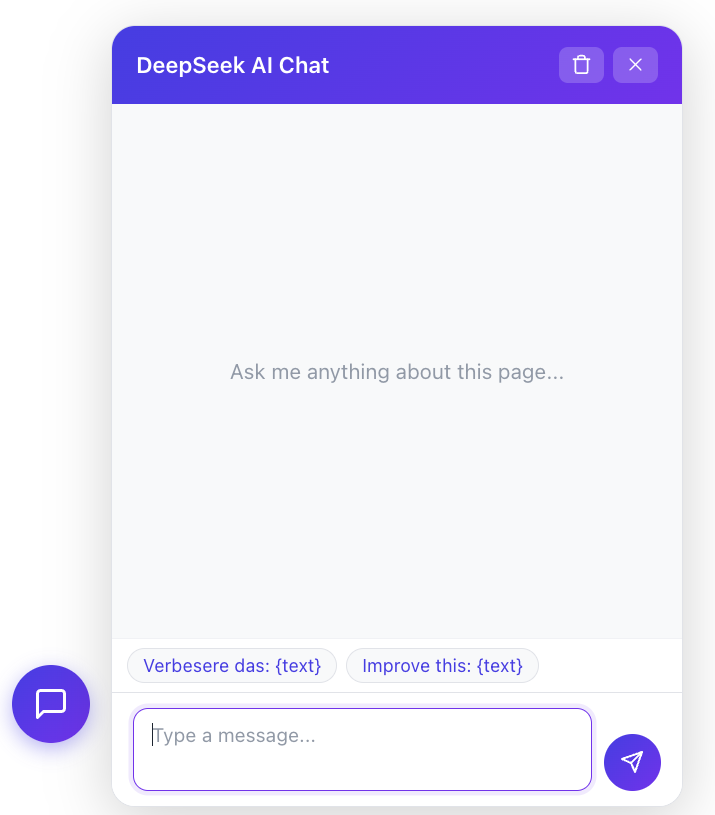
Click the floating purple button to open the chat dialog. Type your message and press Enter. The extension sends the current page text as context to DeepSeek AI, which delivers informed, concise responses — all without leaving the page you’re on.
- Click the floating button to open chat
- Type your message and press Enter
- AI reads the page context and responds
- Copy any response with one click

Fully Configurable
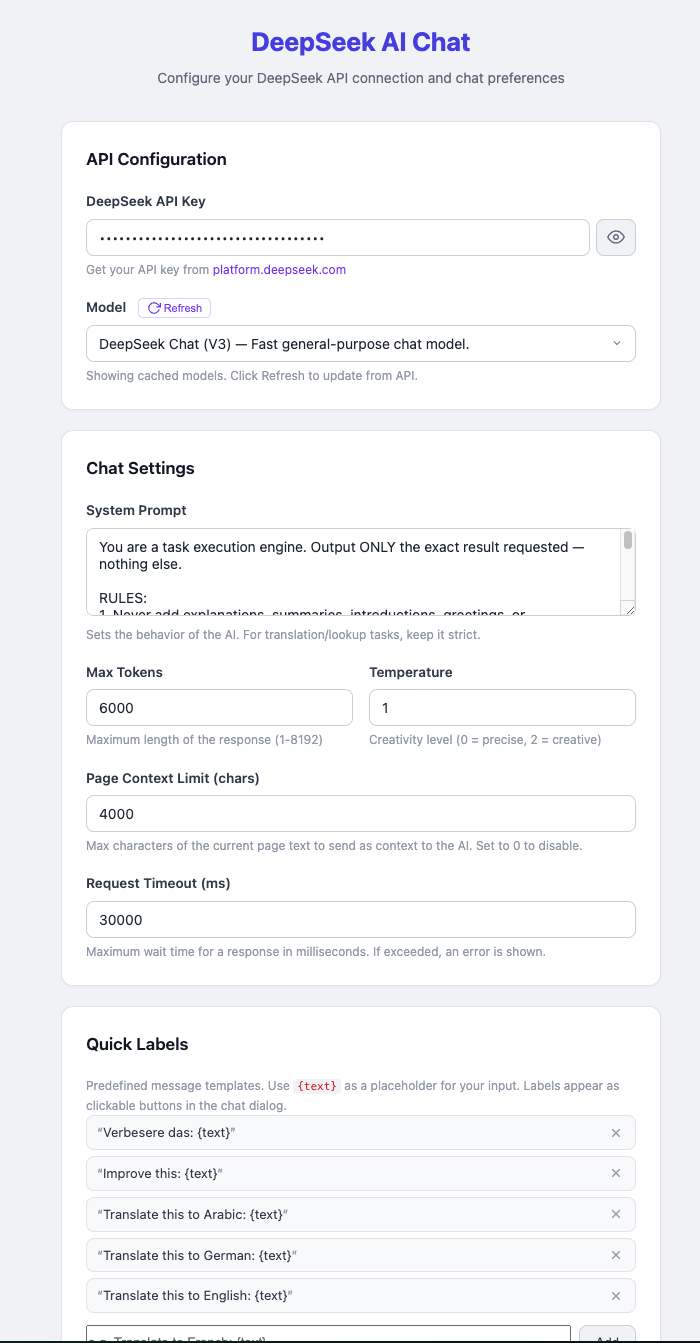
Customize everything from the Options page: API key, model selection, system prompt, max tokens, temperature, page context limit, request timeout, and up to 15 quick labels.
- DeepSeek API integration
- Dynamic model fetching
- Configurable temperature
- Strict system prompt
- Preamble stripping
- Request timeout control
Technical Specifications
Chat Dialog
380×520px panel with send button, Enter to submit, Shift+Enter for newline.
Max Tokens
1–8192 tokens configurable. Default 2048 for balanced responses.
Chat History
Per-tab history storage (max 50 messages). Persisted in storage.local.
Frequently Asked Questions
DeepSeek AI Chat is a cross-browser extension that adds a moveable floating AI chat button to every page you visit. Powered by the DeepSeek API, it lets you chat with AI on any website — reading the page content as context to give you informed, relevant answers.
Yes! The extension is completely free and open source under the MIT license. You only need a DeepSeek API key (available at platform.deepseek.com) to power the AI responses. The API itself has its own pricing, but the extension itself costs nothing.
The extension supports Chrome 121+, Firefox 121+, and Opera. It uses Manifest V3 with a shared codebase, so it works seamlessly across all supported browsers. Firefox users need version 115+ with the strict_min_version set in the manifest.
When you send a message, the extension extracts visible text from the current page and sends it as context to the AI — up to a configurable limit (default 4000 chars). This lets the AI understand what you’re looking at and provide answers relevant to the page content. You can disable this or adjust the limit in Options.
Yes. Your API key is stored exclusively in your browser’s local storage via the storage.local API. It never leaves your browser except when making API calls directly from the extension to DeepSeek’s servers. No data is sent to any third party.
Download the source from GitLab, load the extension unpacked in your browser’s developer mode, then right-click the extension icon and open Options. Enter your DeepSeek API key, refresh the model list, save settings, and you’re ready to chat on any page.
Try DeepSeek AI Chat Today
Free, open-source, and available for all major browsers.